> ## Documentation Index
> Fetch the complete documentation index at: https://docs.aryn.ai/llms.txt
> Use this file to discover all available pages before exploring further.
# Tutorial: Property Extraction with the Aryn SDK
> Using the Aryn SDK to extract properties from a document
## Introduction
In this tutorial, we will walk through an example of using DocParse to extract structured metadata from a document. This lets you combine document parsing and semantic field extraction with a single API call. We will be working with a [sample insurance document](https://aryn-public.s3.us-east-1.amazonaws.com/extraction-tutorial/gri.pdf) that contains information about a workers compensation reinsurance submission.
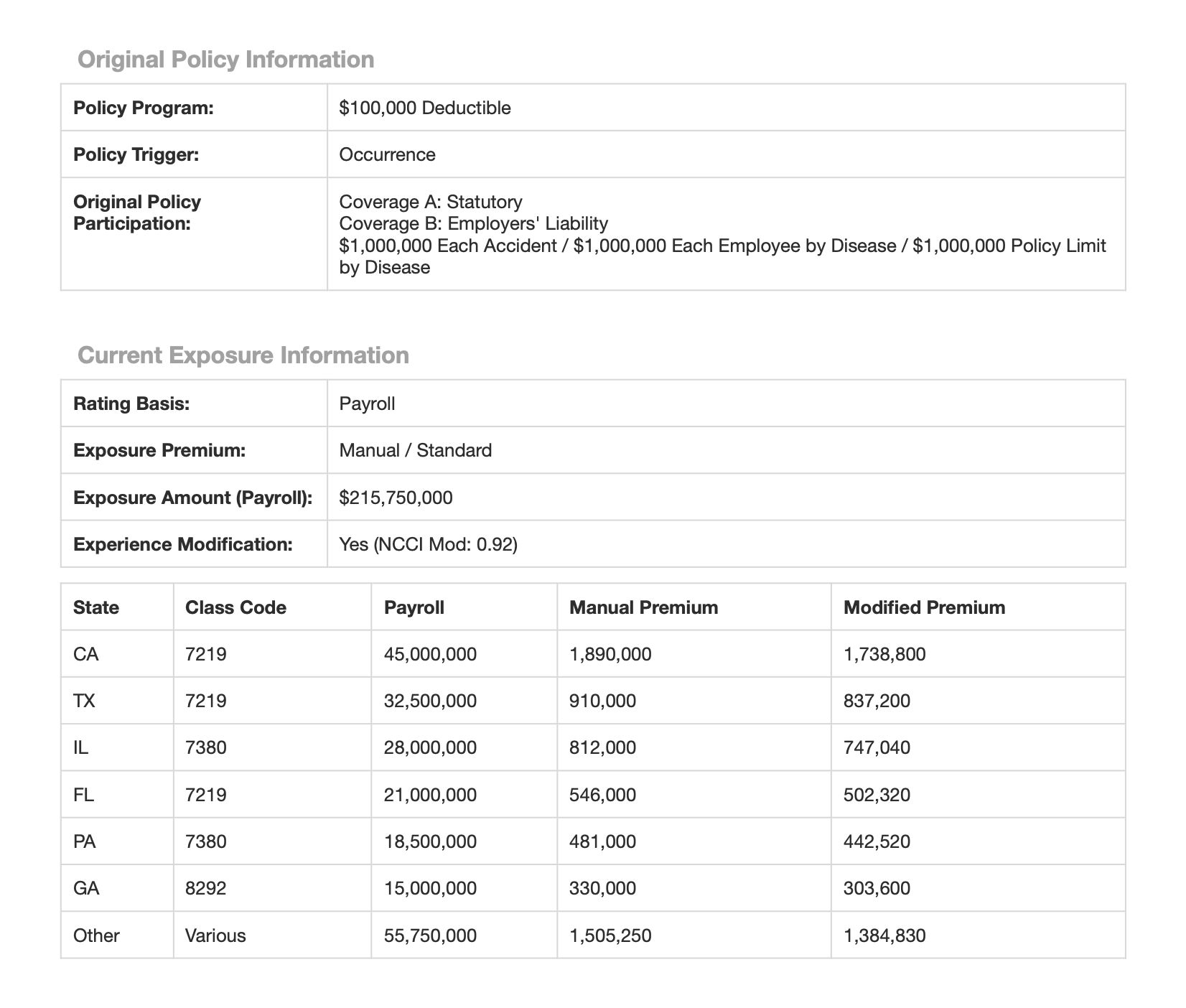 By the end of this tutorial, you will be able to extract properties into structured JSON like the following using the Aryn SDK.
```json theme={null}
{
...
"properties": {
"Submission Date": "2026-09-15T00:00:00",
"Submission Contact Email": "jane.doe@globalre-demo.com",
...
"Current Exposure Info": {
"Rating Basis": "Payroll",
"Exposure Premium": "Manual / Standard",
"Exposure Amount": 215750000,
"Exposure Amount Currency": "USD",
"Exposure Modification": "Yes (NCCI Mod: 0.92)",
"Current Exposure Information": [
{
"State": "CA",
"Class Code": "7219",
"Payroll": 45000000,
"Manual Premium": 1890000,
"Modified Premium": 1738800
},
{
"State": "TX",
"Class Code": "7219",
"Payroll": 32500000,
"Manual Premium": 910000,
"Modified Premium": 837200
},
{
"State": "IL",
"Class Code": "7380",
"Payroll": 28000000,
"Manual Premium": 812000,
"Modified Premium": 747040
},
...
]
}
}
}
```
Let's start simple and build up to more complex use cases.
## Prerequisites
1. Get your free Aryn API key by signing up on the Aryn Console at [app.aryn.ai](https://app.aryn.ai).
2. Open up the [follow-along Colab notebook](https://colab.research.google.com/drive/18Pw_jHSpIv9vt6wMBZaIe561CPBAxaaK?usp=sharing) and copy in your API key by clicking the key icon on the leftmost side of the screen.
Then, click the \`\`+ Add new secret'' button in blue on the left hand side of your screen.
Finally, add your Aryn API key in the value field under the name "ARYN\_API\_KEY".
Alternatively, you can set the API key as an environment variable and follow along locally instead of on Colab.
3. Download the [sample document](https://aryn-public.s3.us-east-1.amazonaws.com/extraction-tutorial/gri.pdf) or have your own handy.
## Schemas
Property extraction is based on a *schema* that defines what to extract. A schema is a list of properties, each of which have a name, a type, and optional fields like a description, default value, and example values. These fields are used to guide the LLM on what to extract.
While you can provide the Schema as a dictionary, the Aryn SDK also includes a Pydantic model that makes it easy to work with schemas. For example, the following code creates a schema with two fields:
```python theme={null}
from aryn_sdk.types.schema import DataType, make_property, make_named_property, Schema
schema = Schema(
properties=[
make_named_property(
name="Submission Date",
type=DataType.DATE,
description="The submission date of the claim."
),
make_named_property(
name="Submission Contact Email",
type=DataType.STRING,
description="The submission contact email."
)
]
)
```
## Step 1: Simple Property Extraction
You can extract all of the fields a schema by specifying the schema under `property_extraction_options`.
```python theme={null}
import json
from aryn_sdk.partition import partition_file
data = partition_file(
"gri.pdf",
table_mode="standard",
property_extraction_options={
"schema": schema
},
)
print(json.dumps(data, indent=4))
```
Note here that we set the `table_mode` to `standard`. This ensures that we can extract properties that are present in tables, such as the Submission Contact Email.
In the output, you will see a separate top-level key \`\`properties'' that contains the extracted properties. For this document, you should see something like the following:
```json theme={null}
{
"elements": {...}
"properties": {
"Submission Date": "2025-09-15T00:00:00",
"Submission Contact Email": "jane.doe@globalre-demo.com"
}
}
```
## Step 2: Extracting Nested Data with Arrays
It's common to want to extract multiple records from a single document, each of which has a similar schema. For example, in the sample document, the current exposure information is broken out by state in a table on page 2. You can extract all of these entries with DocParse by specifying a schema containing an array of objects, like the following:
```python theme={null}
state_exposure = make_property(
type=DataType.OBJECT,
properties=[
make_named_property(name="state", type=DataType.STRING),
make_named_property(name="class_code", type=DataType.STRING),
make_named_property(name="payroll", type=DataType.INT),
make_named_property(name="manual premium", type=DataType.INT),
make_named_property(name="modified premium", type=DataType.INT),
]
)
schema = Schema(
properties = [
make_named_property(name="current_exposure", type=DataType.ARRAY, item_type=state_exposure)
]
)
data = partition_file(
"gri.pdf",
table_mode="standard",
property_extraction_options={
"schema": schema
},
)
print(json.dumps(data, indent=4))
```
The \`\`current\_exposure'' property is of type `ARRAY`, and you specify the type of each element in the Array as the `item_type`. In this case, the item type is an object with the fields you want to extract for the individual exposure records. The result of running this script is the following:
```json theme={null}
{
...
"properties": {
"current_exposure": [
{
"state": "CA",
"class_code": "7219",
"payroll": 45000000,
"manual premium": 1890000,
"modified premium": 1738800
},
{
"state": "TX",
"class_code": "7219",
"payroll": 32500000,
"manual premium": 910000,
"modified premium": 837200
},
{
"state": "IL",
"class_code": "7380",
"payroll": 28000000,
"manual premium": 812000,
"modified premium": 747040
},
{
"state": "FL",
"class_code": "7219",
"payroll": 21000000,
"manual premium": 546000,
"modified premium": 502320
},
{
"state": "PA",
"class_code": "7380",
"payroll": 18500000,
"manual premium": 481000,
"modified premium": 442520
},
{
"state": "GA",
"class_code": "8292",
"payroll": 15000000,
"manual premium": 330000,
"modified premium": 303600
},
{
"state": "Other",
"class_code": "Various",
"payroll": 55750000,
"manual premium": 1505250,
"modified premium": 1384830
}
]
}
}
```
Notice that each entry in the Current Exposures table is extracted as a separate array element in the returned JSON.
{/* ### Validation */}
{/* Here's an example of a property with a regex validator to check the format of the submission contact email is not unreasonable. Currently, only regex validators are supported. */}
{/* import json */}
{/* submission_date_property = { */}
{/* "type": { */}
{/* "description": "The submission date of the claim", */}
{/* } */}
{/* "name": "Submission Contact Email", */}
{/* "type": "string", */}
{/* "validators": [ */}
{/* "type": "regex", */}
{/* } */}
{/* }, */}
{/* data = partition_file( */}
{/* table_mode="standard", */}
{/* "schema": { */}
{/* submission_date_property, */}
{/* ] */}
{/* }, */}
{/* print(json.dumps(data, indent=4)) */}
{/* The output should look the same as before. */}
Congratulations! You are now able to extract properties from a document using the Aryn SDK.
You can also do this via the UI on the DocParse page of the [Aryn Console](https://app.aryn.ai/docparse).
By the end of this tutorial, you will be able to extract properties into structured JSON like the following using the Aryn SDK.
```json theme={null}
{
...
"properties": {
"Submission Date": "2026-09-15T00:00:00",
"Submission Contact Email": "jane.doe@globalre-demo.com",
...
"Current Exposure Info": {
"Rating Basis": "Payroll",
"Exposure Premium": "Manual / Standard",
"Exposure Amount": 215750000,
"Exposure Amount Currency": "USD",
"Exposure Modification": "Yes (NCCI Mod: 0.92)",
"Current Exposure Information": [
{
"State": "CA",
"Class Code": "7219",
"Payroll": 45000000,
"Manual Premium": 1890000,
"Modified Premium": 1738800
},
{
"State": "TX",
"Class Code": "7219",
"Payroll": 32500000,
"Manual Premium": 910000,
"Modified Premium": 837200
},
{
"State": "IL",
"Class Code": "7380",
"Payroll": 28000000,
"Manual Premium": 812000,
"Modified Premium": 747040
},
...
]
}
}
}
```
Let's start simple and build up to more complex use cases.
## Prerequisites
1. Get your free Aryn API key by signing up on the Aryn Console at [app.aryn.ai](https://app.aryn.ai).
2. Open up the [follow-along Colab notebook](https://colab.research.google.com/drive/18Pw_jHSpIv9vt6wMBZaIe561CPBAxaaK?usp=sharing) and copy in your API key by clicking the key icon on the leftmost side of the screen.
Then, click the \`\`+ Add new secret'' button in blue on the left hand side of your screen.
Finally, add your Aryn API key in the value field under the name "ARYN\_API\_KEY".
Alternatively, you can set the API key as an environment variable and follow along locally instead of on Colab.
3. Download the [sample document](https://aryn-public.s3.us-east-1.amazonaws.com/extraction-tutorial/gri.pdf) or have your own handy.
## Schemas
Property extraction is based on a *schema* that defines what to extract. A schema is a list of properties, each of which have a name, a type, and optional fields like a description, default value, and example values. These fields are used to guide the LLM on what to extract.
While you can provide the Schema as a dictionary, the Aryn SDK also includes a Pydantic model that makes it easy to work with schemas. For example, the following code creates a schema with two fields:
```python theme={null}
from aryn_sdk.types.schema import DataType, make_property, make_named_property, Schema
schema = Schema(
properties=[
make_named_property(
name="Submission Date",
type=DataType.DATE,
description="The submission date of the claim."
),
make_named_property(
name="Submission Contact Email",
type=DataType.STRING,
description="The submission contact email."
)
]
)
```
## Step 1: Simple Property Extraction
You can extract all of the fields a schema by specifying the schema under `property_extraction_options`.
```python theme={null}
import json
from aryn_sdk.partition import partition_file
data = partition_file(
"gri.pdf",
table_mode="standard",
property_extraction_options={
"schema": schema
},
)
print(json.dumps(data, indent=4))
```
Note here that we set the `table_mode` to `standard`. This ensures that we can extract properties that are present in tables, such as the Submission Contact Email.
In the output, you will see a separate top-level key \`\`properties'' that contains the extracted properties. For this document, you should see something like the following:
```json theme={null}
{
"elements": {...}
"properties": {
"Submission Date": "2025-09-15T00:00:00",
"Submission Contact Email": "jane.doe@globalre-demo.com"
}
}
```
## Step 2: Extracting Nested Data with Arrays
It's common to want to extract multiple records from a single document, each of which has a similar schema. For example, in the sample document, the current exposure information is broken out by state in a table on page 2. You can extract all of these entries with DocParse by specifying a schema containing an array of objects, like the following:
```python theme={null}
state_exposure = make_property(
type=DataType.OBJECT,
properties=[
make_named_property(name="state", type=DataType.STRING),
make_named_property(name="class_code", type=DataType.STRING),
make_named_property(name="payroll", type=DataType.INT),
make_named_property(name="manual premium", type=DataType.INT),
make_named_property(name="modified premium", type=DataType.INT),
]
)
schema = Schema(
properties = [
make_named_property(name="current_exposure", type=DataType.ARRAY, item_type=state_exposure)
]
)
data = partition_file(
"gri.pdf",
table_mode="standard",
property_extraction_options={
"schema": schema
},
)
print(json.dumps(data, indent=4))
```
The \`\`current\_exposure'' property is of type `ARRAY`, and you specify the type of each element in the Array as the `item_type`. In this case, the item type is an object with the fields you want to extract for the individual exposure records. The result of running this script is the following:
```json theme={null}
{
...
"properties": {
"current_exposure": [
{
"state": "CA",
"class_code": "7219",
"payroll": 45000000,
"manual premium": 1890000,
"modified premium": 1738800
},
{
"state": "TX",
"class_code": "7219",
"payroll": 32500000,
"manual premium": 910000,
"modified premium": 837200
},
{
"state": "IL",
"class_code": "7380",
"payroll": 28000000,
"manual premium": 812000,
"modified premium": 747040
},
{
"state": "FL",
"class_code": "7219",
"payroll": 21000000,
"manual premium": 546000,
"modified premium": 502320
},
{
"state": "PA",
"class_code": "7380",
"payroll": 18500000,
"manual premium": 481000,
"modified premium": 442520
},
{
"state": "GA",
"class_code": "8292",
"payroll": 15000000,
"manual premium": 330000,
"modified premium": 303600
},
{
"state": "Other",
"class_code": "Various",
"payroll": 55750000,
"manual premium": 1505250,
"modified premium": 1384830
}
]
}
}
```
Notice that each entry in the Current Exposures table is extracted as a separate array element in the returned JSON.
{/* ### Validation */}
{/* Here's an example of a property with a regex validator to check the format of the submission contact email is not unreasonable. Currently, only regex validators are supported. */}
{/* import json */}
{/* submission_date_property = { */}
{/* "type": { */}
{/* "description": "The submission date of the claim", */}
{/* } */}
{/* "name": "Submission Contact Email", */}
{/* "type": "string", */}
{/* "validators": [ */}
{/* "type": "regex", */}
{/* } */}
{/* }, */}
{/* data = partition_file( */}
{/* table_mode="standard", */}
{/* "schema": { */}
{/* submission_date_property, */}
{/* ] */}
{/* }, */}
{/* print(json.dumps(data, indent=4)) */}
{/* The output should look the same as before. */}
Congratulations! You are now able to extract properties from a document using the Aryn SDK.
You can also do this via the UI on the DocParse page of the [Aryn Console](https://app.aryn.ai/docparse).