> ## Documentation Index
> Fetch the complete documentation index at: https://docs.aryn.ai/llms.txt
> Use this file to discover all available pages before exploring further.
# Tutorial: Table Extraction
> Extract structured table data from PDFs using Aryn DocParse
In [this example](https://colab.research.google.com/drive/1Qpd-llPC-EPzuTwLfnguMnrQk0eclyqJ?usp=sharing), we'll use DocParse to extract a cash flow table (shown below) from the 10-K financial document of 3M, and turn it into a pandas dataframe.
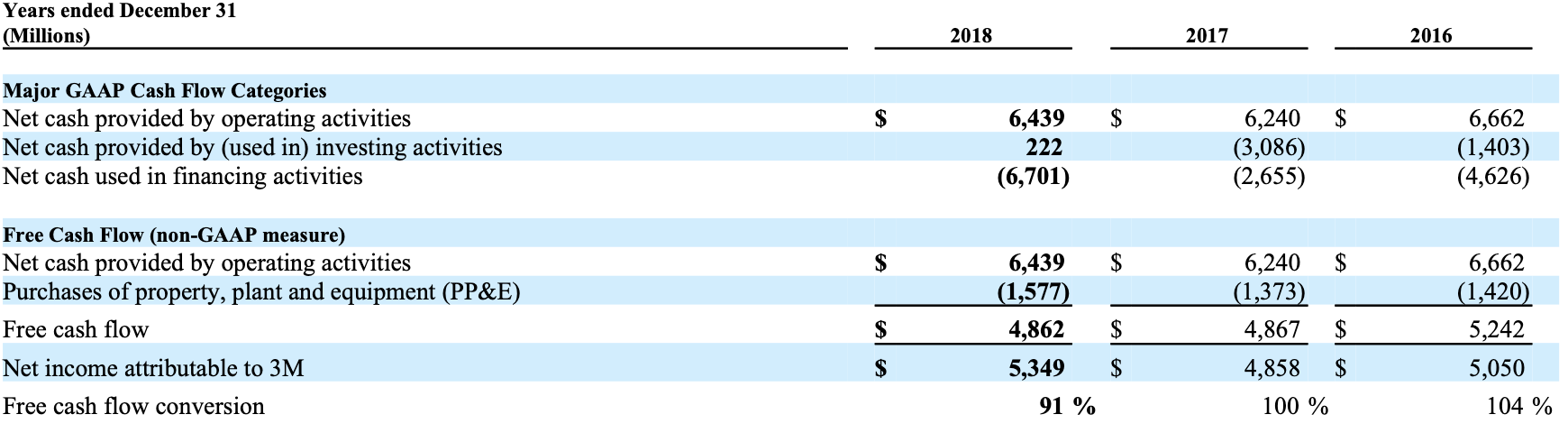 ## Extracting Table Cell from DocParse
```python table_demo.py theme={null}
import aryn_sdk
from aryn_sdk.partition import partition_file, tables_to_pandas
import pandas as pd
from io import BytesIO
file = open('my-document.pdf', 'rb')
aryn_api_key = 'YOUR-KEY-HERE'
## Make a call to Aryn DocParse
## param extract_table_structure (boolean): extract tables and their structural content. default: False
## returns: JSON object with elements representing information inside the PDF
partitioned_file = partition_file(file, aryn_api_key, extract_table_structure=True)
```
If you inspect the partitioned\_file variable, you'll notice that it's a large JSON object with details about all the components in the PDF (check out [this page](../output_structure) to understand the schema of the returned JSON object in detail). Below, we highlight the `table` element that contains the information about the table in the page.
```json output.json theme={null}
{'type': 'table',
'bbox': [0.09049919577205882,
0.35081939697265624,
0.8906761259191176,
0.5200832852450284],
'properties': {'score': 0.9009878635406494,
'title': None,
'columns': None,
'rows': None,
'_element_index': 7,
'page_number': 1},
'text_representation': None,
'table': {'cells': [{'content': 'Years ended December 31 (Millions)',
'rows': [0],
'cols': [0],
'is_header': True,
'bbox': {'x1': 0.09167566636029412,
'y1': 0.3512739424272017,
'x2': 0.355205078125,
'y2': 0.37081939697265626},
'properties': {}},
{'content': '2018',
'rows': [0],
'cols': [1],
'is_header': True,
'bbox': {'x1': 0.5346168428308824,
'y1': 0.3512739424272017,
'x2': 0.6546168428308824,
'y2': 0.37081939697265626},
'properties': {}},
... ]}}
```
In particular let's look at the `cells` field which is an array of cell objects that represent each of the cells in the table. Let's focus on the first element of that list.
```json cells.json theme={null}
{'cells': [{'content': 'Years ended December 31 (Millions)',
'rows': [0],
'cols': [0],
'is_header': True,
'bbox': {'x1': 0.09167566636029412,
'y1': 0.3512739424272017,
'x2': 0.355205078125,
'y2': 0.37081939697265626},
'properties': {}}, ... }
```
## Displaying the Table
Here we've detected the first cell, its bounding box (which indicates the coordinates of the cell in the PDF.), whether it's a header cell and its contents. You can then process this JSON however you'd like for further analysis. In [the notebook](https://colab.research.google.com/drive/1Qpd-llPC-EPzuTwLfnguMnrQk0eclyqJ?usp=sharing) we use the `tables_to_pandas` function to turn the JSON into a pandas dataframe and then perform some analysis on it:
```python display_table.py theme={null}
pandas = tables_to_pandas(partitioned_file)
tables = []
#pull out the tables from the list of elements
for elt, dataframe in pandas:
if elt['type'] == 'table':
tables.append(dataframe)
supplemental_income = tables[0]
display(supplemental_income)
```
The output is given below:
| | Years ended December 31 (Millions) | 2018 | 2017 | 2016 |
| -: | :-------------------------------------------------- | :------- | :------- | :------- |
| 0 | Major GAAP Cash Flow Categories | | | |
| 1 | Net cash provided by operating activities | \$ 6,439 | 6,240 | \$ 6,662 |
| 2 | Net cash provided by (used in) investing activities | 222 | (3,086) | (1,403) |
| 3 | Net cash used in financing activities. | (6,701) | (2,655) | (4,626) |
| 4 | Free Cash Flow (non-GAAP measure) | | | |
| 5 | Net cash provided by operating activities | \$ 6,439 | \$ 6,240 | 6,662 |
| 6 | Purchases of property, plant and equipment (PP\&E | (1,577) | (1,373) | (1,420) |
| 7 | Free cash flow | \$ 4,862 | \$ 4,867 | \$ 5,242 |
| 8 | Net income attributable to 3M | \$ 5,349 | \$ 4,858 | \$ 5,050 |
| 9 | Free cash flow conversion | 91 % | 100 % | 104 % |
## Extracting Table Cell from DocParse
```python table_demo.py theme={null}
import aryn_sdk
from aryn_sdk.partition import partition_file, tables_to_pandas
import pandas as pd
from io import BytesIO
file = open('my-document.pdf', 'rb')
aryn_api_key = 'YOUR-KEY-HERE'
## Make a call to Aryn DocParse
## param extract_table_structure (boolean): extract tables and their structural content. default: False
## returns: JSON object with elements representing information inside the PDF
partitioned_file = partition_file(file, aryn_api_key, extract_table_structure=True)
```
If you inspect the partitioned\_file variable, you'll notice that it's a large JSON object with details about all the components in the PDF (check out [this page](../output_structure) to understand the schema of the returned JSON object in detail). Below, we highlight the `table` element that contains the information about the table in the page.
```json output.json theme={null}
{'type': 'table',
'bbox': [0.09049919577205882,
0.35081939697265624,
0.8906761259191176,
0.5200832852450284],
'properties': {'score': 0.9009878635406494,
'title': None,
'columns': None,
'rows': None,
'_element_index': 7,
'page_number': 1},
'text_representation': None,
'table': {'cells': [{'content': 'Years ended December 31 (Millions)',
'rows': [0],
'cols': [0],
'is_header': True,
'bbox': {'x1': 0.09167566636029412,
'y1': 0.3512739424272017,
'x2': 0.355205078125,
'y2': 0.37081939697265626},
'properties': {}},
{'content': '2018',
'rows': [0],
'cols': [1],
'is_header': True,
'bbox': {'x1': 0.5346168428308824,
'y1': 0.3512739424272017,
'x2': 0.6546168428308824,
'y2': 0.37081939697265626},
'properties': {}},
... ]}}
```
In particular let's look at the `cells` field which is an array of cell objects that represent each of the cells in the table. Let's focus on the first element of that list.
```json cells.json theme={null}
{'cells': [{'content': 'Years ended December 31 (Millions)',
'rows': [0],
'cols': [0],
'is_header': True,
'bbox': {'x1': 0.09167566636029412,
'y1': 0.3512739424272017,
'x2': 0.355205078125,
'y2': 0.37081939697265626},
'properties': {}}, ... }
```
## Displaying the Table
Here we've detected the first cell, its bounding box (which indicates the coordinates of the cell in the PDF.), whether it's a header cell and its contents. You can then process this JSON however you'd like for further analysis. In [the notebook](https://colab.research.google.com/drive/1Qpd-llPC-EPzuTwLfnguMnrQk0eclyqJ?usp=sharing) we use the `tables_to_pandas` function to turn the JSON into a pandas dataframe and then perform some analysis on it:
```python display_table.py theme={null}
pandas = tables_to_pandas(partitioned_file)
tables = []
#pull out the tables from the list of elements
for elt, dataframe in pandas:
if elt['type'] == 'table':
tables.append(dataframe)
supplemental_income = tables[0]
display(supplemental_income)
```
The output is given below:
| | Years ended December 31 (Millions) | 2018 | 2017 | 2016 |
| -: | :-------------------------------------------------- | :------- | :------- | :------- |
| 0 | Major GAAP Cash Flow Categories | | | |
| 1 | Net cash provided by operating activities | \$ 6,439 | 6,240 | \$ 6,662 |
| 2 | Net cash provided by (used in) investing activities | 222 | (3,086) | (1,403) |
| 3 | Net cash used in financing activities. | (6,701) | (2,655) | (4,626) |
| 4 | Free Cash Flow (non-GAAP measure) | | | |
| 5 | Net cash provided by operating activities | \$ 6,439 | \$ 6,240 | 6,662 |
| 6 | Purchases of property, plant and equipment (PP\&E | (1,577) | (1,373) | (1,420) |
| 7 | Free cash flow | \$ 4,862 | \$ 4,867 | \$ 5,242 |
| 8 | Net income attributable to 3M | \$ 5,349 | \$ 4,858 | \$ 5,050 |
| 9 | Free cash flow conversion | 91 % | 100 % | 104 % |